


Emma - Budget Planner Tracker
4.2302.00 Reviews
App Specs
- Version
- 1.40.3
- Updated On
- License
- Free
- Downloads
- 500,000+
- Developer
- Emma Technologies LTD.
- Categories
- Finance
- Platform
- Android
Screenshots
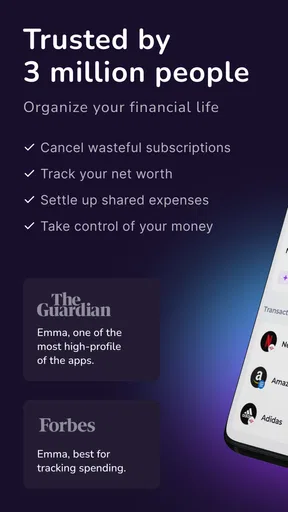
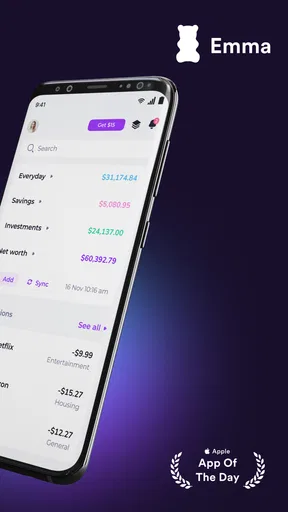
 Analysis by AppCompare
When I first open a money-management app, I want to know what it can help me do today, not just see a wall of charts. Emma is built around a practical routine: bring spending into view, make a plan for it, and keep an eye on recurring costs. That makes Emma - Budget Planner Tracker most useful when I want a clearer picture of everyday money without turning budgeting into a second job.
What a first-time user should expect
Emma is a finance app from Emma Technologies LTD., and its focus is on budgeting, spending, bills, and subscriptions. It is free to install, with optional in-app purchases ranging from $2.99 to $124.99 per item. The app is rated for Everyone, and its current version is 1.40.3, with Android 8.0 as the minimum operating system. Those details make it easy to judge whether it fits your device and whether you are comfortable exploring paid options, but the core decision is simpler: do you want a central place to review money activity, or do you prefer managing every account separately?
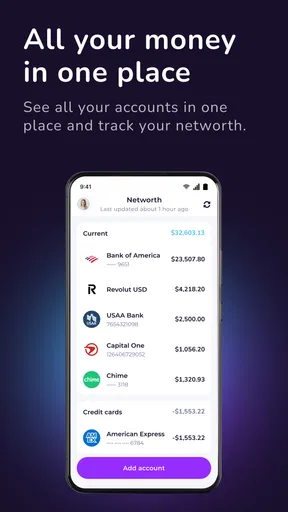
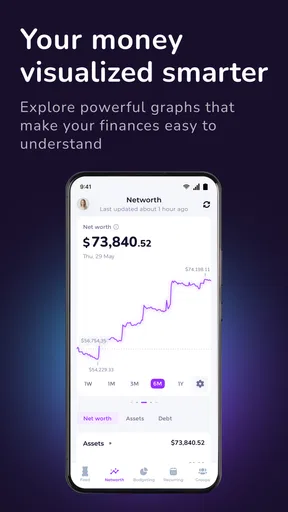
The main appeal is the overview. Instead of checking several banking apps and trying to remember which recurring charge belongs to which account, I can use Emma as a place to look for patterns and plan what I want to spend. That is a different job from making payments or replacing a bank. I would treat it as a companion for financial awareness rather than the only app I need for handling money.
Make the first setup manageable
Connecting accounts is the step that shapes how useful the app can be. Before starting, I would make sure I can sign in to the relevant bank accounts and have time to review what I am agreeing to on each connection screen. If you are cautious about linking accounts, begin with the account you use most for daily spending rather than trying to connect everything at once. A smaller first setup is easier to check and gives you a quick sense of whether Emma’s overview suits the way you manage money.
Once transactions appear, take a moment to scan the categories rather than assuming every label is right. Automatic categorization saves effort, but a budget is only as helpful as the picture behind it. If a purchase looks out of place, correcting or reviewing that entry is a better first move than immediately changing your spending limits. This small check helps prevent a misleading category total from steering your decisions.
Turn one observation into a useful action
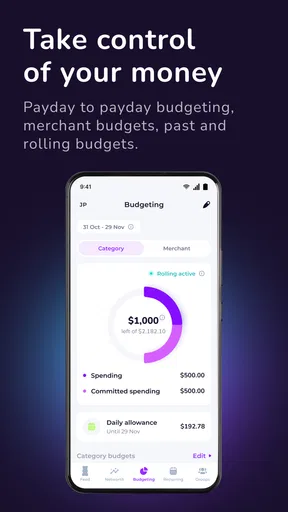
A good first win is to choose one category that genuinely matters to you and set a limit you can live with. I would avoid trying to redesign my entire budget on day one. For example, if takeaway meals are the expense I want to rein in, I can look at the recent pattern, choose a realistic cap, and use the app’s alerts as a prompt to pause before spending more. The point is not to hit an ideal number immediately; it is to make the next choice with better context.
That approach also helps answer a common question: does a budget app actually change anything? It can, but not simply by displaying totals. I find the useful moment is when an alert or category view makes me notice a habit early enough to choose differently. If I set limits that are too strict, I am more likely to ignore them; a modest, believable target gives me a reason to keep checking in.
Worth Reading Before You Choose

EA SPORTS FC Mobile 26 Is a Bigger Football Game, but It Takes Time

Flipboard Shows What News Apps Must Do Beyond the Feed

Switching to Android Auto Means Rethinking Your Driving Routine

Google Calendar Makes a Crowded Week Easier to Manage

Ludo King Makes the Most of the Minutes Between Plans

Baby Panda World Brings Quick Play to Modern Phones, but Its Game Library Feels Busy
Where the overview helps—and where it needs judgment
Emma’s spending breakdown can make small, repeated purchases easier to spot than they are in a bank statement. A handful of convenience-store stops or online orders may not feel significant individually, yet seeing them grouped can help me decide whether the pattern matches my priorities. I would use that view to ask a specific question—such as whether a category is higher than I expected—rather than treating every month-to-month change as a problem.
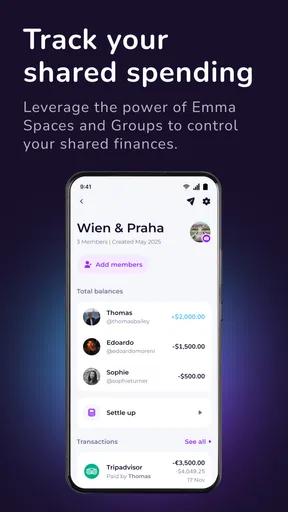
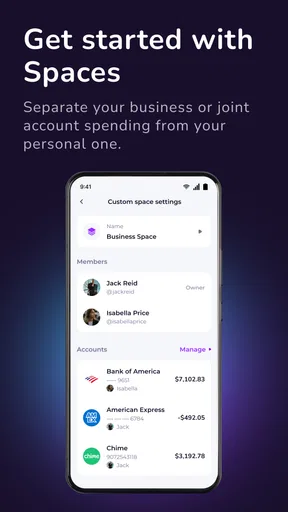
There is a trade-off to automatic tracking: less manual work, but a need to review the result. A transaction can be placed in a category that does not match how I think about it, and a budget based on that label may tell the wrong story. For shared household costs, cash purchases, or spending spread across accounts, I would be especially careful to check what is represented before drawing conclusions. The app can organize the information it sees; it cannot decide what a purchase means to your household.
Use recurring charges as a monthly checkpoint
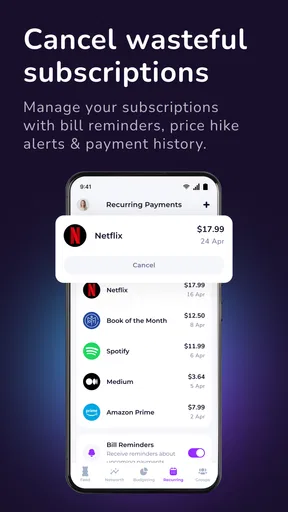
The subscription and bill view is most valuable when I use it as a regular review, not as a one-time cleanup. On a quiet day near the start of a new month, I can scan the recurring charges, ask which ones I still use, and decide whether any deserve attention. That is more actionable than noticing an unfamiliar charge while rushing through a bank statement. It also makes Emma useful for people whose main budgeting problem is not daily overspending but losing track of recurring commitments.
I would still verify an unfamiliar item against the relevant account before taking action. A tracker can draw attention to a charge, but the bank or service provider is where I would confirm its details and manage the payment or cancellation. If you share subscriptions with family or split bills with a partner, a listed charge may be valid even if it is not obvious at first glance. Treat the list as a prompt to investigate, not as proof that something should be cancelled.
Choosing Emma over a spreadsheet or bank app
Compared with a spreadsheet, Emma can reduce the repeated work of entering and sorting transactions, while a spreadsheet gives me more freedom to build a custom system. If I enjoy assigning every purchase to a personally designed plan, or need a particular set of calculations, a spreadsheet may be the better fit. If I mainly want a quicker overview and a nudge to review spending, Emma’s automatic organization is more convenient—provided I am comfortable connecting accounts and checking the categories.
A bank’s own app may be the better choice when I only need balances, recent transactions, or direct control over a particular account. Emma is more appealing when I want to compare spending patterns across my money activity and keep recurring costs in view. Neither approach is automatically superior: the right choice depends on whether I value a broader dashboard or prefer to stay inside each bank’s own tools. I would not install Emma expecting it to replace account management or financial advice.
Who will get the most from it
I think Emma is a strong starting point for someone who has never kept a budget, especially if the hardest part is knowing where to begin. Seeing transactions grouped can turn a vague feeling of “I spend too much” into a more useful question about one or two categories. It can also suit someone who already budgets but wants less manual sorting and a reminder to check recurring charges.
It is less suited to people who do not want to link financial accounts, prefer to enter everything by hand, or need a highly customized forecasting system. It may also feel unnecessary if one bank app already gives you all the summaries and reminders you actually use. I would skip it if account linking itself is a deal-breaker; a manual notebook or spreadsheet can be a more comfortable route, even if it takes more upkeep.
Getting Started with Emma
First off, let's talk setup. Downloading and installing Emma was a breeze. The app is available for both Android and iOS, so no one's left out. Once you've got it on your phone, you’re greeted with a sleek, user-friendly interface that makes navigation a cinch.
Connecting Your Accounts
The first thing Emma prompts you to do is connect your bank accounts. This might sound intimidating, but the process is actually pretty seamless. Emma supports a wide range of banks, and the connection is secure, which means you can breathe easy knowing your details are safe. Once your accounts are linked, Emma starts working its magic by analyzing your transactions.
Tracking Your Spending Habits
Emma excels at giving you a clear picture of your spending habits. The app categorizes your expenses automatically, which is a huge time-saver. Whether it's groceries, dining out, or those sneaky little online purchases, Emma’s got it covered. I loved seeing how my spending broke down because it highlighted areas where I could cut back.
Budgeting Made Simple
Creating a budget in Emma is as easy as pie. You can set limits for different categories, and Emma will notify you if you're getting close to blowing your budget. This feature is a game-changer if you're trying to keep your finances in check. Plus, the app's insights help you make informed decisions, so you're not just guessing where your money went at the end of the month.
Subscriptions and Bills
I was pleasantly surprised by Emma’s ability to track subscriptions and bills. If you’re like me and sometimes forget about that one streaming service you signed up for months ago, this feature is a lifesaver. Emma lists all your subscriptions, so you can easily see what's draining your bank account and make adjustments accordingly.
Saving with Emma
Emma doesn't just help you manage your spending; it also encourages saving. The app offers personalized saving tips based on your financial habits. Whether it’s setting up a rainy day fund or planning a vacation, Emma gives you practical advice on how to reach your goals. I found this aspect particularly motivating because it gave me a clear path to improve my financial health.
Security and Privacy
Let’s not forget the importance of security. Emma uses bank-level encryption to protect your data, and they don’t store your banking credentials. This means you can use the app with confidence, knowing that your information is safe and sound.
Customer Support and Community
If you ever find yourself stuck or have a question, Emma’s support team is just a tap away. The app also has a vibrant community where users can share tips and experiences. I found this aspect really helpful, as it's always nice to know you’re not navigating the financial seas alone.
Keeping the habit realistic
After the first setup, I would give myself a short weekly check-in rather than trying to monitor every transaction as it happens. A quick scan of categories, a look at upcoming recurring costs, and one adjustment to a budget is enough to turn the dashboard into a routine. This is a useful trade-off: Emma can make tracking less laborious, but it still works best when I give the information a little attention instead of expecting the app to make decisions for me.
One practical way to use that check-in is to separate “unexpected” from “unwanted.” A larger expense may be unusual but necessary, while a small recurring charge may be predictable yet no longer worth keeping. Looking at both the category view and recurring list helps me avoid treating every high total as a failure. It shifts the question from “How do I spend less everywhere?” to “Which choice would actually improve my month?”
What to know before relying on it
People often wonder whether the app will tell them exactly what to cancel or how much they should save. I would use its summaries and tips as prompts, not instructions: only you know which expenses matter, what bills are due outside the accounts you have connected, and how much flexibility your situation allows. If you need precise tax records, formal financial planning, or a complete view of cash spending that is not reflected in connected accounts, a dedicated tool or manual record may be more appropriate.
Another sensible question is whether the free entry point means every option is included. Emma is free to install, but it also offers in-app purchases, so I would check the app’s current purchase details before paying for anything and decide whether that option solves a real need. You can start by seeing whether the basic routine—reviewing spending, setting a category limit, and checking recurring charges—helps you. If it does not, there is little reason to add complexity.
My overall take
Emma has a 4.2 average from around 8,300 ratings, with more than 500,000 installs, which suggests it has found a sizable audience without making it the right choice for everyone. What I value most is the combination of categorized spending and recurring-cost awareness: together, they make it easier to spot what deserves a closer look. The version available now is 1.40.3, and the app has been around since October 30, 2017, so it is not a brand-new experiment in personal finance.
In conclusion, Emma - Budget Planner Tracker is a fantastic tool for anyone looking to get a grip on their finances. It's user-friendly, comprehensive, and packed with features that make managing money less of a chore and more of a habit. Whether you're a budgeting newbie or a seasoned pro, Emma adapts to your needs and helps you stay on track. If you haven’t tried it yet, I highly recommend giving Emma a shot—your wallet will thank you!
Pros
- User-friendly interface for easy navigation.
- Customizable budget categories for personalization.
- Real-time expense tracking keeps you updated.
- Integrates with multiple bank accounts seamlessly.
- Offers financial insights and recommendations.
Cons
- Limited features in the free version.
- Syncing issues with some bank accounts.
- Occasional app crashes reported by users.
- Premium features can be expensive.
- Privacy concerns with data sharing.
FAQs for Emma - Budget Planner Tracker
What is Emma - Budget Planner Tracker and how does it work?
Emma is a personal finance app designed to help users manage their budgets, track expenses, and save money. It connects to your bank accounts to provide a comprehensive overview of your financial health. Emma categorizes transactions, offers insights into spending habits, and helps you set financial goals.
Is Emma - Budget Planner Tracker safe to use with my bank information?
Yes, Emma uses bank-level encryption and security measures to protect your financial data. The app connects to banks using secure APIs and never stores your login credentials. Emma is read-only, meaning it cannot move money or make transactions, ensuring your information remains safe.
Can Emma help with saving money and reducing debt?
Absolutely. Emma offers features like budgeting tools, spending alerts, and savings goal trackers. It analyzes your spending patterns to identify areas where you can cut back and offers personalized tips to help you reduce debt and increase savings efficiently.
Is Emma - Budget Planner Tracker free to use?
Emma offers a free version with essential features for budgeting and tracking expenses. For users seeking more advanced tools, such as custom categories and detailed reports, Emma Pro is available through a subscription. The Pro version enhances the app's capabilities with additional insights and features.
Can I use Emma across multiple devices?
Yes, Emma is available on both Android and iOS platforms, allowing you to access your financial data across multiple devices. Your information stays synchronized, so you can manage your finances seamlessly whether you're using your phone or tablet.


